
An AI assistant can help you interpret spending, review a budget or explore upcoming payments. But analysing a file is not the same as accessing and updating records within an app. We compare the documented approaches of ChatGPT, Gemini, Cleo and Toby using three criteria: which data they access, which actions they perform and how you can check the result.
In this article
- What to compare before choosing a financial assistant
- ChatGPT: flexible analysis of files you provide
- Gemini: questions about documents and spreadsheets
- Cleo: a specialised approach with market-specific conditions
- Where Toby stands out within Finantzak
- A fictional example: a projection is not guaranteed money
- What to choose and what to check before sharing data
What to compare before choosing a financial assistant
The label ‘financial AI’ covers different tools. A general-purpose chat can analyse a spreadsheet you provide; an integrated assistant can access information you already organise in its app and use tools to make supported changes. What matters is checking the specific integration rather than assuming capabilities from a product name.
This comparison draws on official documentation consulted on 8 October 2026 and the Finantzak product reference reviewed that day. It is not an independent accuracy test or a ranking of the best model. It does not compare prices either: terms, plans and availability can change.
Four assistants, four ways of working
| Assistant | Information used | What it can help with | What to check |
|---|---|---|---|
| ChatGPT | Files and spreadsheets you provide. | Explore data and prepare tables and charts. | Plan, limits, analysed rows and data controls. |
| Gemini | Documents and spreadsheets you upload. | Query files and create charts in the web app. | Access limits and potential omissions in large files. |
| Cleo | Information and tools depending on the market and account. | Money conversations and tools such as budgets. | Eligibility, country and currently available features. |
| Toby | Authorised Finantzak records. | Query your financial organisation and perform supported changes. | Premium, permissions, enabled tools and the saved result. |
ChatGPT: flexible analysis of files you provide
OpenAI documents spreadsheet and compatible file analysis in ChatGPT, including summarising data and producing tables or charts. Access depends on the model, plan and configuration. If you already have a spending spreadsheet, a useful request could be: ‘Group these transactions by category and explain which rows you included.’
The value lies in exploring information supplied by the user. Uploading a statement does not demonstrate a bank connection or mean that the result is saved in an accounting app. Check the rows used and the original totals: a complex file or scanned table can make accurate extraction difficult. Before uploading personal information, also review ChatGPT’s data controls.
Gemini: questions about documents and spreadsheets
Google’s documentation describes uploading files to Gemini for answers and analysis, as well as generating charts from spreadsheets in its web app. It may be useful for requests such as: ‘Compare these two spreadsheets and separate changes in spending from changes in classification.’
Limits depend on the access option. Google warns that large files can lead to details or relationships between data being missed. Check which parts have been analysed. As with ChatGPT, uploading files does not by itself establish bank synchronisation or the ability to write transactions into another app.
Cleo: a specialised approach with market-specific conditions
Cleo is an example of a money-focused assistant. In its introduction to Cleo 3.0, published on 22 July 2025, the company described tools for accessing information and performing supported actions, such as setting up a budget. This matters for a fair comparison: combining conversation and tools is not exclusive to Toby.
That announcement explains an approach, but does not confirm that all its components remain available today. Cleo’s UK terms from August 2026 describe consent-based access to account information and budgeting tools, with UK residency requirements. These conditions should not automatically be applied to Spain. Check the market, eligibility and current features before choosing it.
Where Toby stands out within Finantzak
Toby’s strength is the continuity between conversation and financial organisation. If your transactions are already recorded in Finantzak, it can access authorised information to answer questions such as ‘How much have I spent on groceries this month compared with last month?’ You do not need to prepare a new spreadsheet for each query, although Toby does not know about expenses or external accounts you have not added.
With writing tools enabled and the necessary permissions, it can also prepare and carry out supported changes to transactions, accounts, categories, budgets, debts and planning. For example, you can ask it to record an expense, specifying the amount and account. A chat reply does not prove that anything was saved: check the operation’s result and then the record, including its account, date and amount.
Toby requires Premium, a connection, applicable consent and service availability; usage quotas and confirmation controls apply. Its current conversational financial context is the authorised personal space, not all shared spaces. The check dated 8 October 2026 in the official reference recorded Toby’s shopping tools as disabled, although shopping lists existed in the interface. Recording an operation does not move real money at a bank.
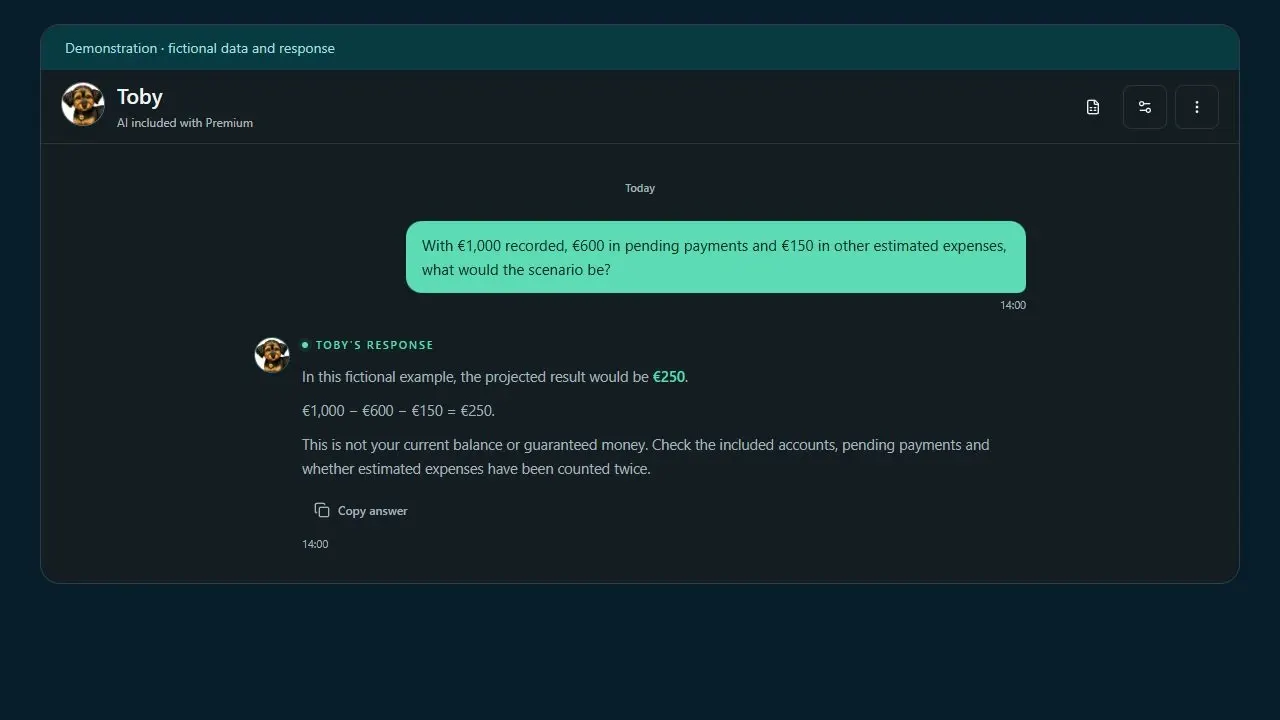
A fictional example: a projection is not guaranteed money
Suppose the total recorded balance across the included accounts is 1,000 euros, planned outstanding payments are 600 euros and estimated other expenses are 150 euros, with no new income during the period. The scenario would be: 1,000 − 600 − 150 = 250 euros. That is a projected end-of-period balance of 250 euros under those assumptions, not the current balance or a guaranteed amount to spend.
A transfer of 200 euros between two of those accounts belonging to you does not change the total balance of 1,000 euros or add an expense: it changes where the money is held. To check the scenario, review the included accounts, outstanding payments and whether the estimated 150 euros is counted only once. A payment already reflected in the balance should not be deducted again as outstanding.
Toby can combine balances and planning to explore cash flow and, when sufficient history is available, include a separate estimate of variable expenses. Ask it to explain which data and assumptions it uses. If transactions, history or a known upcoming income payment are missing, the forecast has less coverage. Simulating an income date does not automatically create a real income record.
From recorded balance to projected scenario
- Recorded balance
- 1,000 EUR
- Pending payments
- -600 EUR
- Other estimated expenses
- -150 EUR
- Projected result
- 250 EUR
What to choose and what to check before sharing data
ChatGPT and Gemini may suit you when you need to explore documents or a particular spreadsheet. Cleo documents a specialised financial approach whose offering needs to be checked by market. Toby is particularly relevant if you want to access and organise records you already maintain in Finantzak, moving from a question to a supported action in the same environment. That is a practical difference, not proof that it is more intelligent than every alternative.
Before sharing information, review which data the assistant receives, which provider processes it, which retention conditions apply and which changes it can perform. Finantzak’s privacy policy describes the processing of AI context and its controls; it should not be interpreted as meaning there are no errors or that all information stays on the device. Share only the data you need to and verify important results.
The final criterion is something you can check: can you identify the data used, verify the calculations and confirm what was saved? None of these approaches guarantees savings or replaces professional advice. This review does not use real accounts, private conversations or results attributed to users.
To turn this comparison into a practical review, read our Quarterly spending audit article and check your records before asking an assistant to draw conclusions.
Put it into practice
- Check whether you need to analyse a file or work with records you already organise.
- Verify the platform, market, plan and enabled tools.
- Ask which period, accounts and assumptions are used in each calculation.
- Do not count internal transfers as new income or expenses.
- Check each saved change and review data processing terms.